$ flowproject.agency / marketing.os · [independent digital studio · Budapest]
Bp/00:00:00 HUEN
$ marketing.os --agency --brand yours

Marketing.OS
for agencies:
your brand,
our system

One agency screen for every client, with data refreshed hourly. Your client approves in their own portal with one tap, and every decision leaves a log entry. The interface shows your name, logo and domain, not ours. Built by a software company, and extended on request: integrations, reports, client-specific flows.

Request a 30-minute demo → online · on real client data · no commitment
// what_your_client_sees

What your client sees, under your brand

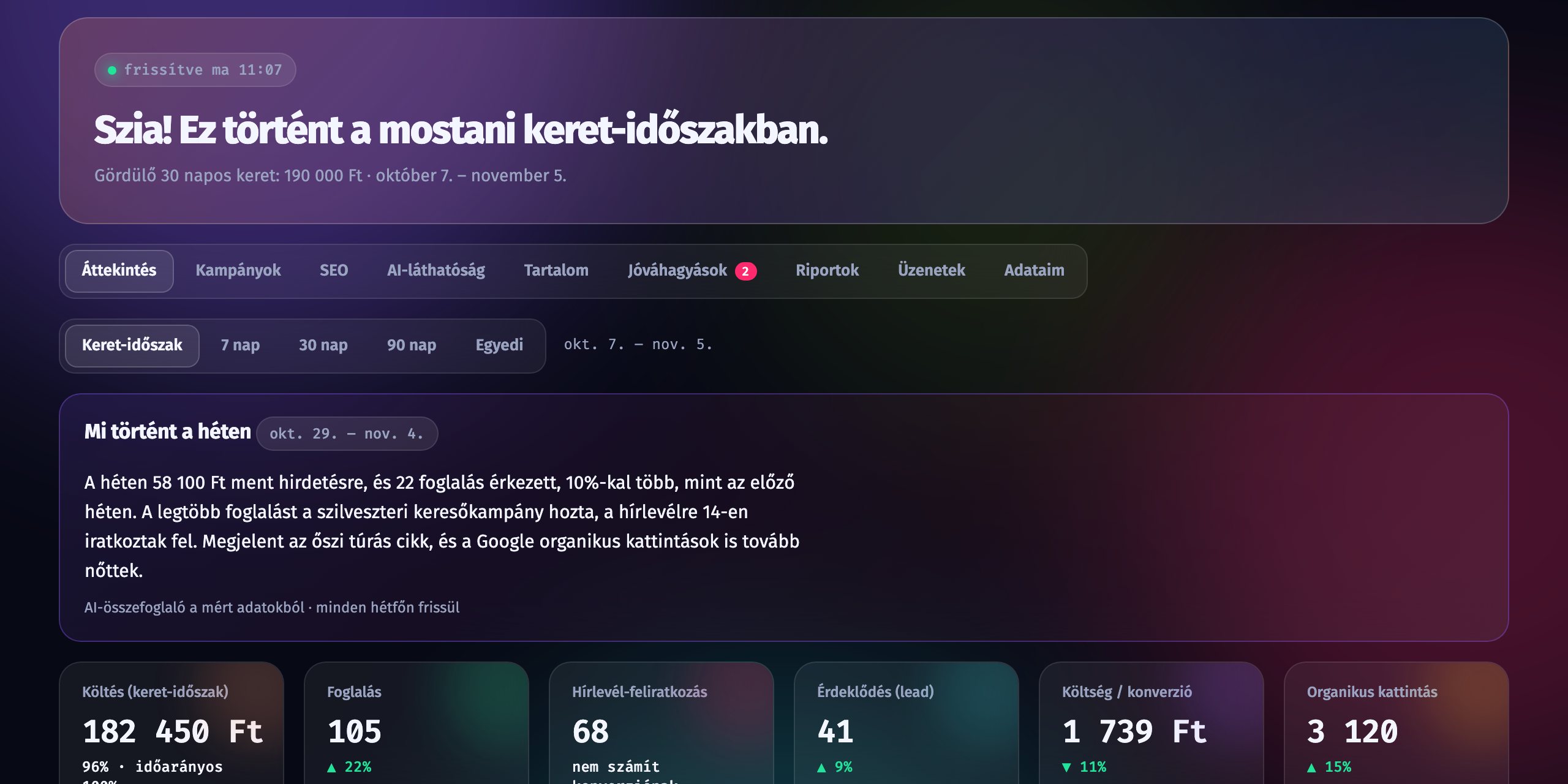
Spend, results and organic traffic in one place; approving posts and ads is one tap; the weekly summary is written by AI from the measured numbers and approved by your colleague. Installable on a phone, with notifications. The demo screens run under our brand; your clients get yours.

Marketing.OS client portal: weekly summary and key numbers
Overview: spend, bookings, sign-ups, AI mentions, refreshed hourly
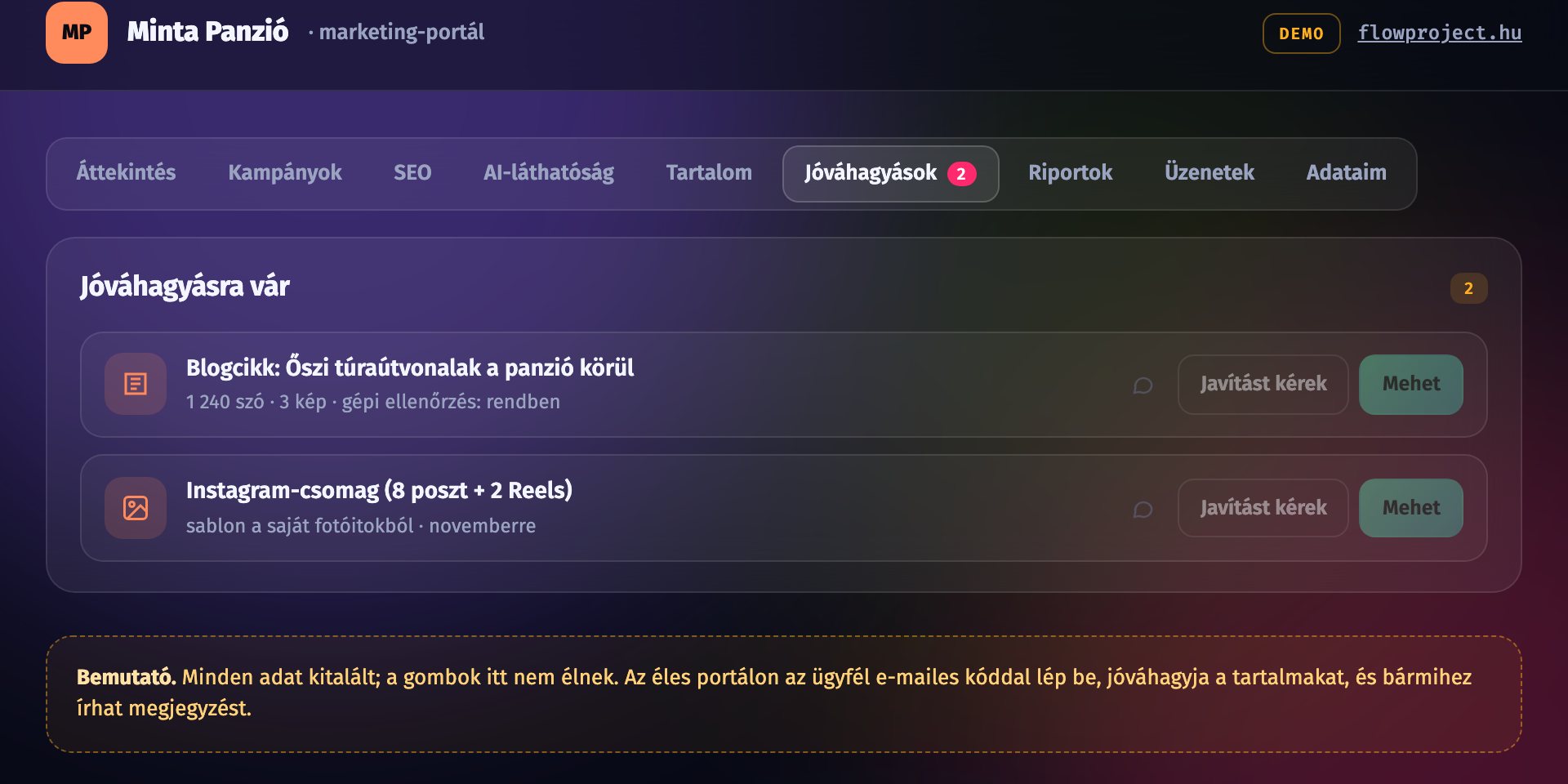
Marketing.OS client portal: content awaiting approval
Approval: “Go” or “Request changes”, one tap, everything in the log
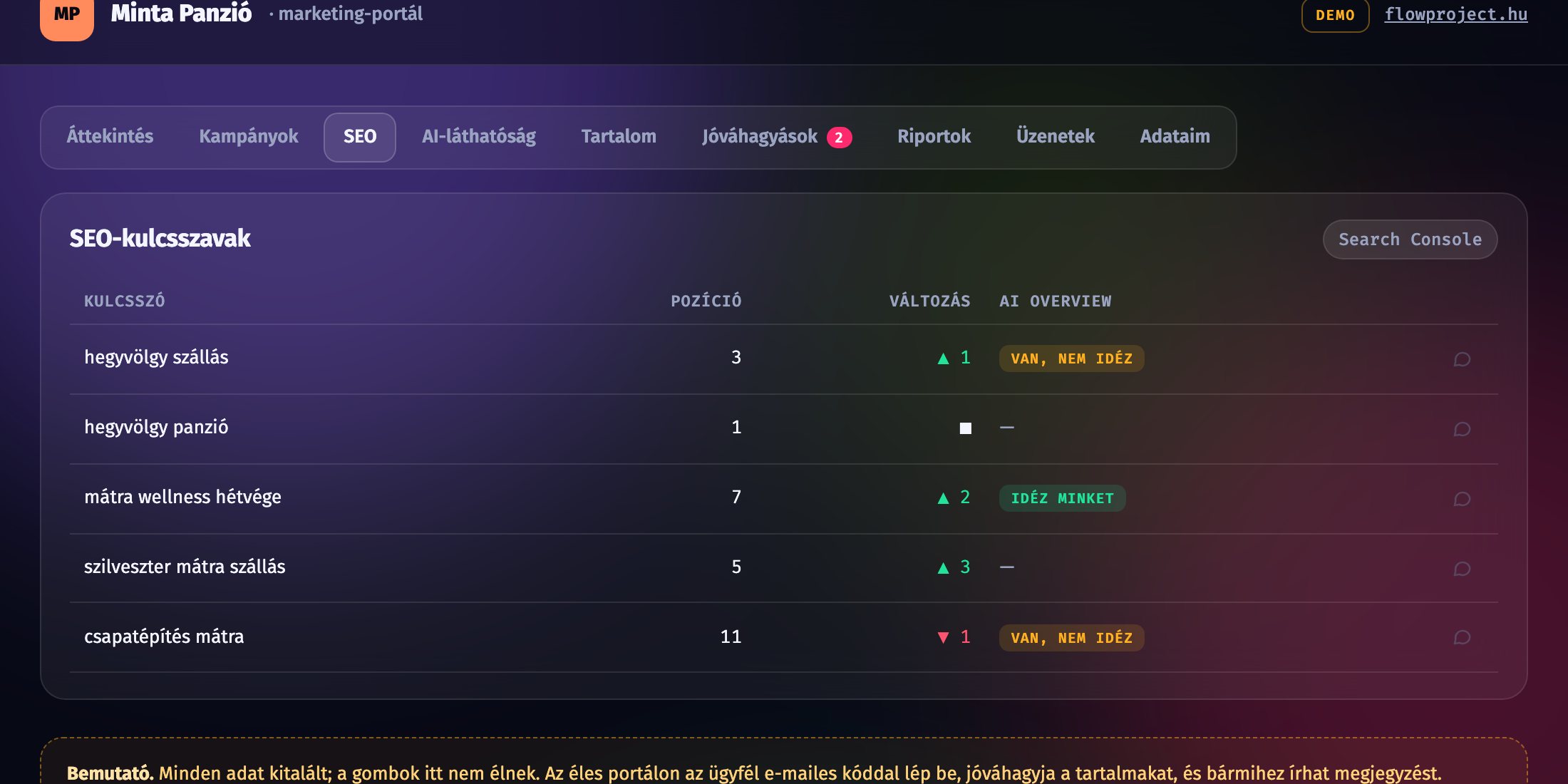
Marketing.OS client portal: SEO keyword positions and AI Overview
SEO and AI visibility: position, change, and whether AI cites the client

Fictional data (Hungarian UI) · the demo is clickable, no login ↗

// what_the_agency_gets

What the agency gets

Not another tool on the pile, but the surface you run your clients on, and the one your clients open too.

[01] admin view

Every client on one screen

  • spend, results, open approvals and alerts per client, in one list
  • data from Google Ads, Meta, GA4 and Search Console refreshed hourly
  • filter by colleague: who runs which client, where something is stuck
[02] client portal

Approval in one tap

  • the client decides from their phone: “Go” or “Request changes”, with a comment
  • every decision in the audit log: who approved or sent back what, and when
  • no more email ping-pong and “that's not what I asked for”
[03] weekly content

Posts, ad variants, SEO drafts

  • generated from the client's data, tone and goals; your colleague reviews
  • publishing happens only after the client's OK, and that cannot be switched off
  • approved material goes out on its own: Meta, Google, WordPress, Business Profile
[04] AI visibility

What AI says about your client

  • share of voice: how often ChatGPT, Gemini and Perplexity mention the client versus competitors
  • tone: recommended, neutral, or someone else suggested instead
  • sources: which pages are cited, and where content is needed because of it
[05] reports

Monthly report, in your branding

  • from measured numbers; AI writes the summary, your colleague approves it
  • the client opens it in the portal any time, no PDFs to send around
  • structure set per client: what matters to them comes first
[06] pass-through billing

AI cost per client

  • every AI and data cost itemised per client
  • exported in one click for the monthly invoicing
  • no hidden fees and no blended “platform cost”
// white_label

Your name on the door

The portal runs under your agency's name, logo and colours, on your own domain, for example portal.youragency.com. Notification emails and push messages go out in your name too.

Your client sees an agency, not a third party. Marketing.OS and FlowProject appear nowhere in the client's interface. The client relationship, the contract and the pricing are yours; we provide and operate the system.

Request a 30-minute demo →

https://portal.youragency.com/approvals
Overview
Approvals · 3
Reports
Log
Instagram post · FridayGo
Meta ad · 2 variantsRequest changes
Blog article · SEO draftGo

Example: the orange is the agency's colour, not ours. Name, logo, colours and domain are your settings.

// own_integrations

Your accounts, your keys, your data

[01] own keys

Costs land on your accounts

  • Meta, Google Ads, GA4 and Search Console through your own agency accounts
  • AI providers (OpenAI, Anthropic, Google) run on your API keys, so the cost shows up directly with you
  • rotate or revoke a key any time; the system tells you when one has expired
[02] CSV export

Every table is yours

  • spend, results, content, approvals and the audit log can be exported
  • per client or across all clients, filtered by period
  • for invoicing and for your own reporting
[03] read API

Into your own BI tool

  • token-based, read-only API for Looker Studio, Power BI or Metabase
  • access can be narrowed per client
  • your current tools stay: the platform reads the same ad and analytics accounts
// we_are_developers

Not a boxed tool: a software company behind it

FlowProject Kft. is a software development company. We wrote Marketing.OS from the first line to the last, and we operate it. That is the difference from boxed tools: there you land on a wish list, here it is a request and a quote.

  • Integrations on request. Booking system, webshop, CRM, newsletter, invoicing, the client's own data source: if it has an API, we connect it and it shows up on the client's screen.
  • Custom reports. If one of your clients needs a different structure or a different metric, we build it; they don't have to fit the existing template.
  • Client-specific flows. Two-step approval, legal review, franchise structures, several brands under one client: we build a process, not a workaround.
  • A stable base. The system runs live in our own agency work; what we give you is what we use every day.

Have a client who needs something custom? Bring them to the demo and we'll tell you how much work it is.

Request a 30-minute demo →
// how_it_starts

Demo, pilot, rollout

You don't have to move every client at once. We start with one or two, run the first weeks together, and only then bring in the rest.

Pricing isn't public: it is per client and agreed in the demo, for your number of clients and channels.

  1. 01
    30-minute live demo

    We show the admin view, the client portal and the audit log on real client data. You tell us what's missing.

  2. 02
    Pilot with 1–2 of your clients

    We set up your brand and domain, connect the accounts and keys, and review the results together in the first weeks.

  3. 03
    Rollout

    The remaining clients and your colleagues' access follow. If the pilot showed that custom development is needed, we quote it separately.

// request_demo

Request a 30-minute demo

Tell us how many clients you'd bring onto the platform and what takes the most manual work today. We'll prepare the demo from that.

  • a live online demo on real client data
  • we look at how your clients would run on the platform
  • per-client pricing, agreed in the demo
  • no commitment

We only use these details to arrange the demo. Privacy policy

// faq

Frequently asked questions

Can agencies or clients see each other's data?

No. Agency users only see their own clients, and a client only sees their own data. Data is stored separately per agency, and you can narrow your colleagues' access per client as well.

Who owns the client relationship?

You do. The contract, the pricing and the communication stay between you; your client is not our client. We provide and operate the system, and FlowProject's name does not appear in the client's interface.

How much does it cost?

Pricing isn't public: it is per client and agreed in the demo for your number of clients and channels. AI and data costs run on your own keys, so they show up directly with you and can be passed through.

Where is the data hosted?

In the European Union, in a European data centre. Processing follows the GDPR, and we sign the data processing agreement before the pilot.

Can we keep our current tools?

Yes. The platform reads the same ad and analytics accounts you use today; nothing needs replacing. With the CSV export and the read API it also connects to your own BI tool.

What happens if the client doesn't approve something?

It doesn't go out. The system sends a reminder and your colleague sees the open item in the admin view, but without the client's OK nothing is published and no budget changes.